My Halo News.com

The latest news about the Halo series of games from Microsoft

  • HowTo: Play on XBOX Live thru your Windows Mobile cell phone


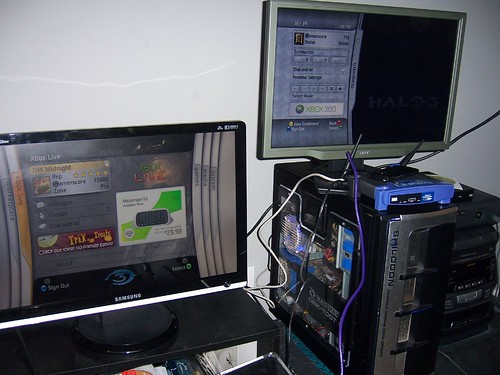
    Notice the Cingular Blackjack atop the Linksys router and two 360s logged into XBL

    XBL with your cell phone?! You bet! If you are in an area where broadband is unavailable, and your only means of an internet connection is dial-up, then you have an alternative. Your cell phone. For XBL, and much more. Read on about how we had 10 XBOX 360’s connected to XBOX Live via my cell phone.

    I know this, because until just recently, I was in that situation. I live in a rural hell which I define as anywhere without available broadband internet.

    I am a resourceful person. I searched and exhausted any and all options to get broadband at my house. Cable/DSL/T1… you name it– I have looked into it. None of these were an option for me. Of the 3 or 4 different cable companies in my area, none serviced my address, nor had any immediate plans to. My house is too far away from the nearest telecom station for me to recieve a DSL signal. A T1 connection would just cost too much. Not a realistic choice. I was stuck with dial-up, which never yielded more than 26kbps for me. My internet was slower than two old people scrumping.

    Another thing you should know about me: I am stubborn. Too stubborn to live with what many of my neighbors live with, have been living with for quite some time, and will probably continue to live with. My next option? Wireless. But where to start? There are not that many carriers, and the devices are somewhat cumbersome as far as what they’ll accomplish. But, I knew that there were OTA transmissions on a cell phone network that reached speeds far in excess of 26k. It wasn’t as good as Cable or DSL, but it was a start. My research led me to the Samsung i607 Blackjack on AT&Ts EDGE (and soon 3G, but we’ll get into that later) network.

    Why this phone? Several reasons. 1) It is 3G capable. 3G is a general term, referring to cell phone networks that are rolling out a 3rd generation wireless data streams capable of broadband speeds, using a signal called UMTS (Universal Mobile Telecommunications Systems) 2) It has Windows Mobile on it. I knew I needed something that would play nice with my XP Pro PC. Other data devices are available, some with WinMobile, others with their own O/Ss. The Blackjack had the most features, and the best capabilities to price ratio for my needs.

    So how did I use a cell phone as my ISP? Windows has a neat little feature called Internet Connection Sharing. This does exactly what you’d think, it enables a PC to share it’s internet connection with other local PCs, via a small local network, or even a crossover cable. Both PCs need to have ICS, so both need Windows, hence my need for Windows Mobile on the device. The Blackjack, when you think about it, is really more of a PC than a phone. It has a processor. It has memory. And it has storage, although not in the form of a hard drive, but flash storage. It also has an I/O system, and an OS. It has networking capabilities, both wired and wireless. It meets all the basic criteria of a PC. With the included software, you can sync it w/ your PC, and share data between the two. None of this is news to most folks.

    What I did find to be surprising, both to myself and others, is that by “bridging” the connection that my PC uses (i.e. my Blackjack connected via USB) to my Local Connection (ie my Xbox 360 via ethernet) I could connect to XBL. At this point, it’s less complicated, yet more confusing than you’d think. On my part, it required a little research, a moderate amount of reboots, and more trial-and-error than anything else.
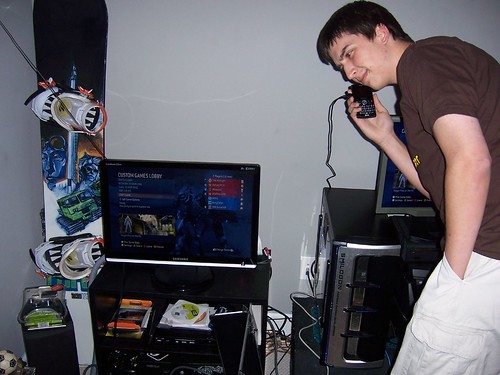

    Matt places an order for pizza while the people at the LAN party are connected to XBOX Live

    FYI: AT&T is rolling out their 3G services for Huntsville in November of 2007. AT&Ts 3G is capable of 3.6Mbps download and 384Kbps upload. Those are peak speeds, and are dependent on factors such as signal strength, interference, and other things inherent to wireless technology. Note that 3G was not available for me at the time of this release, nor during my sessions of XBL via my cell phone. I normally get speeds of 160Kbps down, and 80Kbps up.

    So how is it done? Here’s the “uncomplicated, yet confusing” part. It was confusing to me, b/c I kept trying to use the “modem” feature of the Blackjack. This, while possible, and an option for anyone who wants to use it, has four major flaws: 1) It is significantly slower. This was apparent to me when browsing with IE6 on my PC was clearly slower than the Blackjack’s own Mobile IE browser. 2) It does not charge when it is in “modem” mode. 3) It uses up minutes. 4) In WinXP, you cannot bridge a dial-up connection w/ a high-speed connection. They BOTH have to be high-speed connections. The importance of this is moot if you’re only using the connection to surf. But if you want to share it with other PCs (or an Xbox 360) in your house, you must be able to bridge.

    Then I found out about ICS. While I knew before-hand that my PC had it, I did NOT know, until having done more research, that the Blackjack had it. All I had to do was install the included data-sync software, plug the phone into the PC via USB, open ICS on the Blackjack, and select “Connect”. WinXP recognized it as an internet connection, and when I opened IE or Firefox, viola, I was connected.

    At this point, and having seen the dramatic speed improvement, I began wondering about Xbox Live. Could I possibly connect to XBL using my PCs connection? Even if that connection is from a cell phone? Only one way to find out!

    I connected everything, my Blackjack to my PC’s USB port, and my Xbox to my PC’s ethernet port, opened up “Network Connections” from the Control Panel, highlighted both “High-Speed Data Connections”, right-clicked on either one, and selected “Bridge Connections”. I then made a few changes to my Xbox Network settings (when I used my router, there were no changes necessary, but using a crossover cable, I had to make some IP and DNS changes), and I was signing onto XBL through my cell phone!

    What followed? I recently hosted a Halo 3 LAN party (HALOween) and we had 10 XBOX 360’s connected to XBOX Live through my cell phone. We even made a call for pizza while the boxes were connected. Because we were signed into XBOX Live at the LAN party, our stats and scores got uploaded to the Bungie.net servers. We could even download Halo 3 map variants and gametypes from XBOX Live.

    I hope you found this little tutorial informing and entertaining. Right now, I wouldn’t recommend this unless it is your only option. But, as wireless technology becomes more robust, and data devices advance, this will be a viable option for many users in the near future.


    BTW: Goku got a RRoD


  • HowTo: Play XBL thru your cell phone

    XBL with your cell phone?! You bet! If you are in an area where broadband is unavailable, and your only means of an internet connection is dial-up, then you have an alternative. Your cell phone. For XBL, and much more.

    I know this, because until just recently, I was in that situation. I live in a rural hell which I define as anywhere without available broadband internet.

    I am a resourceful person. I searched and exhausted any and all options to get broadband at my house. Cable/DSL/T1… you name it– I have looked into it. None of these were an option for me. Of the 3 or 4 different cable companies in my area, none serviced my address, nor had any immediate plans to. My house is too far away from the nearest telecom station for me to recieve a DSL signal. A T1 connection would just cost too much. Not a realistic choice. I was stuck with dial-up, which never yielded more than 26kbps for me. My internet was slower than two old people scrumping.

    Another thing you should know about me: I am stubborn. Too stubborn to live with what many of my neighbors live with, have been living with for quite some time, and will probably continue to live with. My next option? Wireless. But where to start? There are not that many carriers, and the devices are somewhat cumbersome as far as what they’ll accomplish. But, I knew that there were OTA transmissions on a cell phone network that reached speeds far in excess of 26k. It wasn’t as good as Cable or DSL, but it was a start. My research led me to the Samsung i607 Blackjack on AT&Ts EDGE (and soon 3G, but we’ll get into that later) network.

    Why this phone? Several reasons. 1.) It is 3G capable. 3G is a general term, referring to Cell phone networks that are rolling out a 3rd generation wireless data streams capable of broadband speeds, using a signal called UMTS (Universal Mobile Telecommunications Systems) 2.) It has Windows Mobile on it. I knew I needed something that would play nice with my XP Pro PC. Other data devices are available, some with WinMobile, others with their own O/Ss. The Blackjack had the most features, and the best capabilities to price ratio for my needs.

    So how did I use a cell phone as my ISP? Windows has a neat little feature called Internet Connection Sharing. This does exactly what you’d think, it enables a PC to share it’s internet connection with other local PCs, via a small local network, or even a crossover cable. Both PCs need to have ICS, so both need Windows, hence my need for Windows Mobile on the device. The Blackjack, when you think about it, is really more of a PC than a phone. It has a processor. It has memory. And it has storage, although not in the form of a hard drive, but flash storage. It also has an I/O system, and an OS. It has networking capabilities, both wired and wireless. It meets all the basic criteria of a PC. With the included software, you can sync it w/ your PC, and share data between the two. None of this is news to most folks.

    What I did find to be surprising, both to myself and others, is that by “bridging” the connection that my PC uses, i.e. my Blackjack, which connects via USB, to my Local Connection, being my Xbox, via ethernet, I could connect to XBL. At this point, it’s less complicated, yet more confusing than you’d think. On my part, it required a little research, a moderate amount of reboots, and more trial-and-error than anything else.

    FYI: AT&T is rolling out their 3G services for Huntsville in November of 2007. AT&Ts 3G is capable of 3.6Mbps download and 384Kbps upload. Those are peak speeds, and are dependent on factors such as signal strength, interference, and other things inherent to wireless technology. Note that 3G was not available for me at the time of this release, nor during my sessions of XBL via my cell phone. I was getting speeds of 160Kbps down, and 80Kbps up.

    So how is it done? Here’s the “uncomplicated, yet confusing” part. It was confusing to me, b/c I kept trying to use the “modem” feature of the Blackjack. This, while possible, and an option for anyone who wants to use it, has four major flaws: 1) It is significantly slower. This was apparent to me when browsing with IE6 on my PC was clearly slower than the Blackjack’s own Mobile IE browser. 2) It does not charge when it is in “modem” mode. 3) It uses up minutes. 4) In WinXP, you cannot bridge a dial-up connection w/ a high-speed connection. They BOTH have to be high-speed connections. The importance of this is moot if you’re only using the connection to surf. But if you want to share it with other PCs (or an Xbox) in your house, you must be able to bridge.

    Then I found out about ICS. While I knew before-hand that my PC had it, I did NOT know, until having done more research, that the Blackjack had it. All I had to do was install the included data-sync software, plug the phone into the PC via USB, open ICS on the Blackjack, and select “Connect”. WinXP recognized it as an internet connection, and when I opened IE or Firefox, voila, I was connected.

    At this point, and having seen the dramatic speed improvement, I began wondering about Xbox Live. Could I possibly connect to XBL using my PCs connection? Even if that connection is from a cell phone? Only one way to find out!

    I connected everything, my Blackjack to my PC’s USB port, and my Xbox to my PC’s ethernet port, opened up “Network Connections” from the Control Panel, highlighted both “High-Speed Data Connections”, right-clicked on either one, and selected “Bridge Connections”. I then made a few changes to my Xbox Network settings (when I used my router, there were no changes necessary, but using a crossover cable, I had to make some IP and DNS changes), and I was signing onto XBL through my cell phone!

    I hope you found this little tutorial informing and entertaining. Right now, I wouldn’t recommend this unless it is your only option. But, as wireless technology becomes more robust, and data devices advance, this will be a viable option for many users in the near future.


  • Two New Halo 3 Guides

    TalkXbox.com has posted two new strategy guides – one for The Pit, 4v4 Team Slayer, and one for Last Resort, Assault/Territories. They’re looking for feedback on these – they were written by different folks. Let ’em know what you think!(Louis Wu 19:37:07 UTC)

  • Present Arms.

    Great crossover today from Stuntmutt – go read One One Se7en.(Louis Wu 18:02:42 UTC)

  • Building Excitement

    Interesting – FirstShowing.net has news of a new Peter Jackson/Neill Blomkamp project, called ‘District 9’ – a live-action sci-fi flick. FS suggests that this might be a way to stir up interest in the Halo project again… not a bad theory. Thanks, Anton P. Nym.(Louis Wu 17:10:18 UTC)

  • Rampancy.net – Podcast and Pistol Page

    Good stuff over at Rampancy.net – there’s a new episode of the Anger, Sadness, and Envy podcast, and there’s a new page for the Weapon Guide – this one covers the Halo 3 Pistol. The podcast covers Crow’s Nest, but spends a lot of time discussing voice actors and acting. (Louis Wu 17:00:40 UTC)

  • Wasted Grievances

    TTL Demag0gue continues his Reclaimer comic – Chapter One Part 3 is now up. (Louis Wu 16:50:34 UTC)

  • On like Donkey Kong

    Rota Jota points out a Halo-related strip (maybe the beginning of a series?) at PvP today.(Louis Wu 16:49:08 UTC)

  • People will sell anything these days.

    InAmb3rClad let us know (with not inconsiderable scorn) that someone is selling the service of beating two levels of Halo 3 on Legendary – all you have to do is pass along your gamertag and password, and then once he’s finished, you can recover it. Before you jump in on this one, read this timely warning from Major Nelson, seemingly written specifically to keep you away from offers like this one.(Louis Wu 16:32:02 UTC)

  • Remote Control Warthog

    Hawty “eBayWatch Babe” McBloggy found a remote control warthog for sale – you’ve got almost a week, starting bid is $75, and there are no bids yet. Go read about it.(Louis Wu 16:26:04 UTC)

  • A helmet claimed

    Yesterday, we mentioned an eBay’d helmet – we got mail from Spase, at the 405th, whose helmet that is. He sent along a link to a bigger pic of the helmet, if you were on the fence.(Louis Wu 16:21:13 UTC)

  • Face It – now for sale

    You might remember ‘Face It’, a song commissioned by Xbox Australia for Halo marketing. According to ODST05, you can now actually buy it.(Louis Wu 16:14:09 UTC)

  • Stickydoom

    DJLO missed our deadline for the Guilt O’ Lantern contest – but he still made a pretty cool little pumpkin thingamabob. You can watch a YouTube video that covers the pumpkin (and some other stuff), or you can watch shortened versions that show just the pumpkin itself (about 3 and a half megs, in either WMP9 or QuickTime formats). I bet this would have done pretty well!(Louis Wu 15:00:30 UTC)

  • Remakable maps

    MLGPro.com put up a list of five maps they’d like to see remade for Halo 3 – I’d probably pass on their last two, but it’s a good list nonetheless. I found it via Google News, but evildoctorwill got it posted on our forum before i had a chance to put it on the front page.(Louis Wu 14:44:35 UTC)

  • A pair of helmets, sold yesterday

    He was a little late for actual bidding (or I was, in posting), but MikeSierra noticed a pair of helmets (one standard, one a hybrid from a bunch of popular sources) that sold yesterday – they both went for between two and three hundred dollars. Next time!(Louis Wu 14:41:43 UTC)

  • Geezers Taken to the Cleaners

    Bungie played (and beat, badly) a contingent from the Geezer Gamers in this week’s Halo Humpday Challenge… ouch. Thanks, DHalo.(Louis Wu 14:37:58 UTC)

  • Friday’s Fan Fiction

    Ten new pieces for you this week in the Fan Fiction section… go read!(Louis Wu 14:35:56 UTC)

  • Pistol

    Today’s addition to the Halo 3 Weapons Guide is the Pistol, a dual-wieldable weapon of Human origin.

     Click here for the complete text.


  • Anger, Sadness And Envy Episode 2: Crow’s Nest

    Narcogen and Trindacut examine the second level of Halo 3, A Crow’s Nest, for Anger, Sadness & Envy, the official podcast of Bungie fansite Rampancy.net. Features include an interview with the Prophet of Truth, changes to voice actors, and Halo 3’s equivalent of the Jackal sniper: the invincible Brute chieftain.

    This is the M4A version of the episode, compatible with iTunes; it contains advanced features such as embedded graphics and chapter markers. If you want the plain MP3 version to play in a browser, go here:

    http://rampancy.net/audio/h3_maps/crows_nest/02112007/anger%2C_sadness_and_envy_episode_2%3A_crow%2526%2523039%3Bs_nest_%28mp3%29


  • She knows how to pick ’em.

    A bit later than expected, but the Cortana cutscenes are now online in the Halo 3 Cutscene Library. 3 vids, about 2.5 minutes of total footage.(Louis Wu 02:15:28 UTC)