-
Podtacular 124 part 2 of 2
Foo Mo Jive pointed out that Podtacular 124 part 2 of 2 is now up – more discussion of ‘the new Halo 3 Hotness’ (as discussed in EGM). Go listen!(Louis Wu 18:36:04 UTC)
-
Well-Earned Promotion.
Stuntmutt wants in on the current Halo 3 Marketing craze – check today’s One One Se7en.(Louis Wu 17:44:37 UTC)
-
Gearing up for Launch, Fan-style
Devastator decided to upgrade his Nightmare Armor Spartan helmet – no more painted ridges, now they’re REAL! Very snazzy.(Louis Wu 16:02:15 UTC)
-
-
Friday’s Fan Fiction
Thirteen new stories this week in the Fan Fiction section – busy week!(Louis Wu 14:18:28 UTC)
-
Video Connections Demystified

When I first started learning about audio and video with my Playstation 2, which was super cool in 2000 because it doubled as a DVD player, I was rather intimidated by all the terminology involved with gaming and home theater audio/video. Only through constant internet forum perusing have I been able to keep semi-knowledgeable on the subject, and the problem has only gotten worse with the addition of tons of new connections/formats/signals since then. In an effort to help those who may be starting the venture fresh, this article seeks to demystify one of the main sources of confusion: connections and cables. I shall start with video connections. A small amount of basic knowledge may be required when we get into resolutions, HDTV, and bandwidth, but I will try to keep this as entry level as possible. Unfortunately, breaking down the many video formats is outside the scope of this article (the definition of 480i, 480p, 720p, 1080i, and 1080p). However, I have linked you to the wiki on each topic, and there are plenty of resources available on the net to better understand video formats. The title of each section also links to the relevant wiki. Without further ado, the following is a comprehensive description of all video connections you are likely to encounter in North America in the year 2007.
[Disclaimer to video geeks: I am trying to make this easy for a beginner, so I am going to present some facts in a way that may not be 100% technically correct (e.g. 480p is SDTV at twice the speed). I am also going to ignore PAL. Spare me the nasty comments on what an ignoramus I am and try to understand the intent. If you think I am genuinely wrong then please point it out and we’ll discuss.]
Click ‘read more’ for the full scoop.

Analog. Old faithful. You may know it by the name “RCA,” which is the commonly used term for the connector on the end of the cable. This is probably the video connection you are most accustomed to. Video is transferred via one “hot” wire in the center with some wire mesh shielding that acts as the “ground.” Can transmit 480i video, which is standard definition TV programming, but nothing better.

Analog. The slightly better looking sister of composite video. S-Video is short for “separate video.” It transmits the video via two separate signals: one for color and the other for brightness. This keeps the signals from becoming intermingled and interfering with one another. Can transmit 480i and nothing more. In the late 90s S-Video was the cat’s pajamas for home theater enthusiasts because of it’s superior signal to composite video. I have read that S-Video is 20% better than composite. I don’t know how the author of that statistic defined “better.” S-Video is almost a bastard step-child these days because it was originally meant for getting the most out of your standard definition TV (SDTV), but nobody cares about pushing SDTV to the limit anymore because HDTV is so much better. You will find it on many video sources in your house, but it will probably rarely be used.

Analog. Don’t confuse “component” with “composite.” If S-video is the slightly better looking sister to composite, component is an even better looking set of triplets next door. Yeah, it’s that good. Component is essentially the current station wagon for video sources of all kinds. It supports 480i, 480p, 720p, 1080i, and 1080p. Yes, you read that correctly. Component video has the bandwidth to support 1080p. Finding devices that accept 1080p via component inputs is the issue, not the cable’s ability to transmit the format. Even before the HDTV revolution component video became the way to go because it supported 480p (progressive scan SDTV, essentially SDTV at twice the frame rate) from DVD players. It then became the new standard for HDTV once 720p and 1080i came on the scene. Component video breaks the video signal into three different parts, so it has the bandwidth to transmit a lot of information. This makes it very useful, and you’ll find it on almost all new standard and high-definition sources and displays. Reminder: all three cables transmit video, and you’ll need an additional audio connection for sound.

Analog. Stands for “video graphics array.” You’ve seen this on your computer, as it’s the most popular way to get video from your PC to its monitor. Beware: VGA is also the common term for the resolution 640×480, but the VGA “connection” can do much more than that. Supports resolutions from 480i all the way up to 1080p and beyond. It’s pretty versatile, but finding a consumer display (excluding computer monitors) that accepts VGA may be an issue. Even if your TV has a VGA input, it may not support a HDTV resolution via VGA. You just have to check the manufacturer’s specs on your TV to know for sure. Recently I know that some Sony DLP HDTVs accept up to 720p via VGA, Toshibas usually don’t accept any widescreen resolutions, and Samsungs accept up to 1080p. I use my Xbox 360 at 1080p on my Samsung DLP HDTV. VGA is great for computer monitors, and a capable input for TVs, but with the latter you have to do your homework to ensure it will function as you desire.
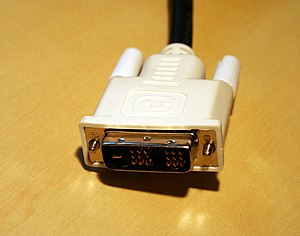
Digital or Analog. Stands for “digital visual interface” or “digital video interface” depending on who you ask. DVI is the much better looking and more capable cousin of VGA, kind of like Tasha Yar from Star Trek The Next Generation (VGA) and Seven of Nine from Star Trek Voyager (DVI). You might have seen this on computer monitors and video cards, as it is most often used for PCs and LCD monitors. Can support all currently encoded high definition resolutions and more (1080p, 1440p, etc). Directly compatible with HDMI (to be discussed below). All it takes to turn a DVI connection into a HDMI connection is a cheap adapter, but be careful, DVI comes in many different flavors (outside the scope of this article, but here’s a link), and you’ll need the right one for a DVI/HDMI conversion (no DVI-A). Like VGA, it is uncommon to see DVI as part of the average home theater setup, but it has its uses,
especially as a tool to get video from a PC to a HDTV via a DVI/HDMI converter.A word about digital versus analog connections: Digital is better. Why? Because it’s much more difficult for a digital signal to get distorted or “misunderstood.” It’s a sequence of 1s and 0s. It either gets there or it doesn’t. Analog signals are susceptible to many types of interference from other electronic signals, and while shielding on the cable reduces this greatly, there’s just no better way to transmit the signal perfectly than through a digital connection. Analog connections work great–they’ve been used with great success for years, but if you have a choice then digital is the way to go. Oh, and by the way, don’t ever pay Best Buy, Circuit City, or anyone else for an expensive digital cable (DVI, HDMI, digital optical audio, digital coax audio). As I said, the signal either gets there or it doesn’t. A $100 digital cable from Monster will perform exactly the same as my $5.18 digital cable from a bargain basement internet retailer. It used to make a difference with analog connections, but not with digital.

Digital. Stands for “high definition multimedia interface.” In 2002 a bunch of smart Japanese guys got together and said “This is frickin ridiculous. Have you looked at the back of our entertainment centers lately? There’s 12 different types of cables carrying 8 different types of signals, and if something goes wrong our wives aren’t even going to try to troubleshoot…they’ll just take the credit card and go shopping. Something’s got to be done.” As described above, there are many limitations on what type of signal each connection can carry and how prevalent it is among consumer electronics. HDMI was created as a new standard to unite everyone, like the Big Three should have done with oil filters 70 years ago. It was created to carry signals digitally, support every current conceivable HDTV resolution (even 1440p, which doesn’t really exist yet), be expandable, and also carry audio on the same connection! HDMI is the new one-stop connection for home theater goodness. The future will work like this: Buy a video source (game console, HD-DVD player, etc), plug it in, connect its HDMI cable to your TV, you’re done. You’ll probably
want to use an A/V receiver for the sound, but you won’t be required to, or even use a separate cable. HDMI already has substantial market penetration, and many consumers who have bought devices in the past two years have an HDMI connection. Whether they are using it is a different story.Side note on HDMI: there are several point release versions of HDMI (1.0, 1.1, 1.2, 1.3). Unless you are on the bleeding edge of A/V technology it does not make any difference right now. HDMI 1.3 is much touted right now in high end A/V advertisements, but as of today I know of no A/V equipment that can take advantage of it better than HDMI 1.2 In five years maybe it will matter.
So there it is, a roundup of all the video connections you’re likely to see on consumer devices in North America in the year 2007. I hope this helps demystify the subject and bring a little more clarity to discussions of connecting high definition video gear. Hit me with questions, and feel free to add to the discussion or point out anything that could be explained better.
-
I’m too slow.
So a few hours ago, Frankie stopped by to post a request for questions for tomorrow’s (today’s) Bungie Weekly Update; I’d planned to go to bed and post all the Halo news in the queue in the morning… but once I saw his note, I wanted to clear the queue, so his post could be on top, where it would be seen the best. Of course, it took me WAY longer to get through the queue than it took him to get enough questions to work with… so the thread was locked before I ever got around to publicizing it. No matter, though – there’s some good reading in those questions… and the queue’s nearly empty. Time for sleep?(Louis Wu 07:53:06 UTC)
-
Site of Champions?
boesman noticed a page at IGN that suggested something big is coming from Microsoft on August 22 – and it seems to have something to do with Halo. (I have it on good authority, though, that Bungie has nothing to do with this; make of that what you will.)(Louis Wu 07:45:40 UTC)
-
Eisen’s Elite Helmet
Eisen Feuer created an Elite Helmet pounded from metal; you can wear it, or you can use it to kill medium-sized animals. He posted about it on our forum, pointing to a DeviantART page – but he also gave us permission to put up a series of shots. Go look – it’s pretty cool.(Louis Wu 07:32:43 UTC)
-
Schooled.
The latest Halo Humpday Challenge is posted at Bungie.net; Luke and Frankie took on a pair of artists (Tom Doyle and Steve Cotton) and then spent the rest of the night coming up with excuses for why they (Luke and Frankie) lost. Okay, not that many excuses. But still… anyway, thanks, MasterChief2829.(Louis Wu 07:17:21 UTC)
-
Lost Cause Episode 14
Haloplayer dropped in to let us know that Lost Cause Episode 14 is now up – in a lot of flavors. They had some technical difficulties… but the story’s back, and you can watch it in many formats. Check out his post!(Louis Wu 06:55:00 UTC)
-
Church
Dennis Powers pointed out a new Halo CE Map (not quite ready for download yet) – Crowpath has been working on ‘Church’, and has released a video (available in WMP9 and QuickTime) – it really is pretty amazing to look at. Grab a copy, check it out for yourself.(Louis Wu 06:25:11 UTC)
-
Halo 3 Missile Pack
The Halo 3 Missile Pack has been commented on a bit in the last couple of days – but there’s finally a picture up at Gamestop. As KP noted, the folks at Kotaku were underwhelmed. Forum consensus was that it looks cool, but it shouldn’t say Halo 3 on it.(Louis Wu 06:11:46 UTC)
-
Iris ARG Progress – Server 4 Opens
Avateur stopped by our main forum to point out a summary of the content available from the newly-opened Server 4 at halo3.com – the Iris ARG continues on.(Louis Wu 06:06:44 UTC)
-
SBG FFA tourney results
Namloco let us know that the SBG FFA tournament was a wild success – you can read about it on the SBG website. Cash payout came to almost $200, and people had a great time!(Louis Wu 05:25:03 UTC)
-
Mountain Dew Game Fuel Sweepstakes
And the Halo-branded marketing rolls on. Over at Xbox.com, you’ll find a new Halo sweepstakes discussed; it doesn’t kick off until September 1, but there’s lots of goodies to win. Go read about it! Thanks, KP. (I found it mildly amusing that the Xbox.com page calls it the ‘Mountain Dew Game Fuel Sweepstakes’, whereas the actual sweepstakes website calls it the ‘Halo 3 Slurpee Sweeps’. I’m gonna hold out for the Halo 3 Lard on a Stick Sweeps, myself.)(Louis Wu 05:22:45 UTC)
-
Humpday Challenge: Con Artists
The saddest of times. A Shakespearean tragedy that shall ne’er be repeated.
-
H3 XBox360 Street Date
According to IGN, the Halo 3 Xbox 360 now has an official street date – September 16, just 9 days before Halo 3 is released. You can preorder it from EBGames now. (Louis Wu 21:31:45 UTC)
-
Target Teams Up with WizKids
Oh, man… preorder Halo 3 at Target, and you’ll get an exclusive ActionClix 2-pack (a Master Chief and an Elite). Sounds like collecting them all is gonna be hard… thanks, Anton P. Nym.(Louis Wu 21:23:03 UTC)
-
HDMI now shipping on 360 Premiums. Some stores already have them.

Yesterday photos appeared showing a white XBOX 360 with an HDMI port. Was that a Premium or a white Elite? Well, it was a Premium.
Over on FatWallet.com, one user reported buying an XBOX 360 Premium at their local Target yesterday. On the box was an HDMI logo. The owner confirmed that the Premium did in fact have an HDMI port on the back of the console.
All of a sudden the XBOX 360 has gotten more affordable while getting more powerful. Buy your Premiums with care and make sure you get one with HDMI out.
Tip: Get an HDMI to DVI cable to play your 360 on PC monitors. Don’t buy the cable from Best Buy, CompUSA, Circuit City, etc. They will charge you $50 to $150 for a 6-foot cable. I just bought my cable for $10 from my local computer shop. Recall that the XBOX 360 VGA cable costs $40.
Note: See that port above the HDMI port in the image above? Notice anything different about it? You can’t plug the first-gen XBOX 360 A/V packs into that slot if you have an HDMI cable plugged in at the same time. This may or may not affect anyone. Not worry, Microsoft ships a slimmed down A/V adapter to plug into the 360’s A/V port. You can get Optical Audio and L/R Audio from that adapter.

The latest news about the Halo series of games from Microsoft