

Ever wanted to show your friends that awesome snipe? To relive that tight CTF game? Let the Review Frenzy give you the skinny on the good, and the not so good about Halo 3’s revolutionary Saved Films feature.
What are Saved Films?
“Prove it.â€Â
That’s the challenge that has echoed in the ears of Halo fans since our first game. For hours on end, we would recite tales of amazing kills, awesome snipes, close wins, or just plain old funny moments. The central drawback with this primitive, verbal method of boasting is that your stories become very difficult to prove, and the average Halo gamer has a tendency to exaggerate.

Before, a mediocre double kill with a shotgun could easily become “This crazy awesome game I played, I got an Overkill with a pistol while riding on top of a warthog!†but not anymore. One of the central new features in Halo 3 is the Saved Film. This handy new option puts a myriad of new tools in the hands of the player, it will allow you to relive your favorite moments, watch yourself kill your friends time and time again, and most importantly, it makes “Prove it.†a valid request.
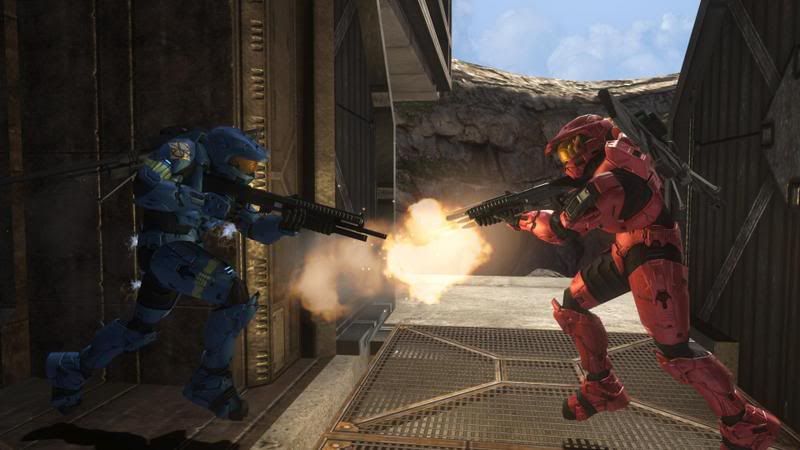
With Saved Films, you can easily watch games you’ve played in the past (and opted to save) from any perspective you want. Games are not saved as video files, but rather as a “script†of sorts, which the game will look at and recreate. To put it in the most basic terms, the game records every movement of every player, object, weapon, vehicle, basically everything that happens in a game you play, and then will look at that data it collected, and basically act out that game for you.
Because the games are not real videos, you have a ton of options for viewing. You can watch the game from the perspective of any player, from a first-person view, a third-person over-the-shoulder view and a freely-orbiting, loose camera. In addition to these camera modes, you can completely detach the camera and fly about the map in any direction you like.
You are able to pause the playback at any time you like (and rewind/fast-forward, although these features don’t work as you might think they would) and still be able to fly about and view the game. Get a great sniper kill? Pause at the moment of the shot and watch your opponent’s death from as many angles as you like! Not sure how the enemy team managed to breach your base in that CTF game? View the game again from the other team’s perspective and learn how they outsmarted you!
Ease of Use
Each time you play a game, it will be added to the “Recent Games†list, accessible from the Theater option on the game’s main menu. The Recent Games list will store the last 25 games you’ve played. If you want to keep a particular recording, you can simply hit the X button while highlighting it on the Recent Games list, and it will be stored to your Hard Drive permanently, or until you decide to remove it.
The Saved Films lobby works just like a standard multiplayer lobby, allowing your friends to come and watch your favorite recordings with you online, making the boasting process significantly easier than ever before.
Controls while viewing videos are easy to learn and very intuitive. The D-pad is used to cycle through the different players, in order to find which one you want to focus on (If any). While you’re focusing on a player, you can click the right-stick to switch from first person, to third person, to orbiting camera. If you’d like to detach from a player and watch the action from your own vantage point, pressing the Y button will toggle attachment to a player, allowing you to fly freely around the map. In free-cam mode, the left thumbstick is used to move forward, backward, and side to side, while the right thumbstick rotates your view , essentially the same stick configuration as your standard game of Halo. The left and right bumpers will float you down and up, respectively, and the left trigger allows you to move faster (So that you don’t need to “hover†across all of Valhalla).
The A button pauses the playback, the B button toggles display of the HUD (helpful for taking screenshots), the X button displays movie controls, and the right trigger controls playback speed. Holding the right trigger down completely will fast-forward, while gently squeezing it will play back the recording in slow motion.
At any time during playback, you can hit the X button to bring up your film controls. These include forward, rewind, stop, record, and an option to take a screenshot. The record function is useful for cutting out a certain part of a film (say, a grenade stick) to show your friends. This makes it easier than having to fast forward to one small part of the film.
The screenshot feature will capture the image that is displayed at that time, and give you the option to upload the finished, high-resolution image to your file share on bungie.net, where others can download it and view it at their leisure.
Wonderful as this all sounds, the Saved Film system is not without issues. The main gripe, and one that severely cripples the player’s enjoyment of the feature, is the lackluster rewind/fast-forward functionality. Fast-forwarding requires the user to squeeze the R button until they reach the desired point. The R button speeds up playback, but not nearly enough to make this procedure any less tedious. After you’ve watched the video once, you are able to skip back and forth between different “waypoints†in the video, but it’s a shame that these only appear after you’ve been forced to squeeze your way through the whole game once.
The rewind feature is almost completely non-existent, and you’re only real option for going backwards is to skip back to a previous waypoint, which could be a fair distance back. Even worse, these waypoints aren’t available at all in campaign mode playback, which is especially distressing since a typical campaign game is much longer than a multiplayer game. If you intended to catch a particularly memorable moment, but accidentally held the R trigger a tad too long, you’ll have no option other than to completely restart the playback. Both of these issues can be easily explained due to technical reasons, but that doesn’t make them any less noticeable or disappointing.
Sharing your Content
Once you’ve found a clip that you feel is brag-worthy, you can upload it to your file share. Your file share is a special spot online that’s reserved for your own content, be it Saved Films, Gametypes, Screenshots, Forge Edits, or what have you. From your file share, other members of Xbox Live can access your videos at any time and download them to their own consoles, to watch and play with as they see fit. Even more useful, fileshares can be accessed from a PC as well. From your PC, you can view your friends’ screenshots taken from inside their saved films and download them to your PC. You of course cannot view Saved Films from your PC, but you can queue them for download to your Xbox Live account, meaning that the next time you log onto Halo 3 from your Xbox 360, any Saved Films which you have queued for download from your PC will be automatically downloaded to your console.
Your standard file share consists of six slots, which can be filled with Saved Films, Pictures, Gametypes, Forge map variants or any combination of the above. As an alternative to the standard file share, budding machinima developers or shutterbugs can opt to purchase a subscription to “Bungie Proâ€Â, which offers one year of an impressive twenty-five slots, for 750 Microsoft Points. Bungie Pro subscriptions can be purchased directly from your file share on your 360 console.
Summary
All in all, Saved Films are an easy-to-use tool, though the aforementioned flaws keep it from being an “awesome†feature, and restricting it to mere greatness. It would have been wonderful to see some more functional film control tools, but the Saved Film feature is still an excellent tool, and just another reason to buy the fantastic Halo 3.
